Nikon D5100 Features
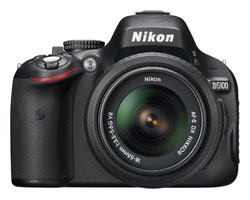
The Nikon D5100 features a flexible LCD screen that flips out from the camera body and rotates for high and low-angle photos and video.
 |
| Release Date: April 2011 |
| Price With Lens: $550 USD |
|
Available at:
|
If you'd like more functionality than you get with the entry-level Nikon D3100 but don't want to pay the price of the more professional D7000, then the D5100 might be the best Nikon digital SLR for you.
Like its more expensive sibling, the Nikon D5100 features a 16.2 megapixel sensor and an ISO range that goes all the way up to 25600.
But the D5100 also shares some aspects of the D3100: most notable are the shape and size of the camera (it's small and light) and the lack of a built-in lens autofocus motor (which means that if you want to use autofocus you need a lens with its own motor).
Though similar in many respects to other Nikon cameras, the D5100 also stands out in its own special way with a flexible 3 inch LCD screen that flips out from the camera body and rotates.
Flexible LCDs help you take still images from odd angles, and they make video capture significantly easier.
Nikon D5100 Features
| Megapixels | 16.2 |
|---|---|
| Stabilization | In Lens |
| Memory Card | SD / SDHC / SDXC |
| Max. Shutter Speed | 1/4000 |
| Max. Photo Capture | 4 per second |
| ISO Range | 100 to 25600 |
| Movie Modes | H.264 1920 x 1080p (30, 25, 24) 1280 x 720p (30, 25, 24) 640 x 424 (30, 25) |
| LCD | Flexible 3in (921,000 dots) |
| Viewfinder | Pentamirror (95% coverage) |
| Autofocus | 11 point |
| Face Detect AF | No |
| Sensor Dimensions | 23.1 x 15.4 (1.5x crop factor) |
| HDMI Port | Yes |
| Live View | Yes |
| Built-in Flash | Yes (Sync: 1/200) |
| Compatible Lenses | Nikon AF-S or AF-I |
| Battery | EN-EL14 LiIon |
| Dimensions | 5.0 x 3.8 x 3.1in 128 x 96 x 79mm |
| Weight | 18oz (510g) |
Join Our Community!
- Learn more about your digital SLR camera
- Get other opinions about camera models
- Share your photos and get feedback
- Learn new DSLR tips and tricks