Canon 600D Features
The Canon 600D features a flexible LCD screen that flips out from the camera body and rotates for high and low-angle shots.
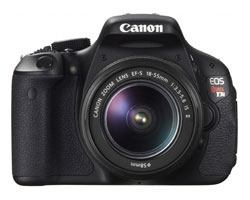 |
| Release Date: March 2011 |
| List Price: $600 USD |
|
Available at:
|
The LCD display is made up of 1.04 million individual dots, making the the photos you view on it appear exceptionally sharp and colorful.
This is the same LCD screen that's available on the more expensive semi-professional Canon 60D.
In addition to the LCD, the Canon 600D also shares something else with the 60D: a Full High Definition 1080p video mode that lets you specify the frame rate (include 24fps, the same speed as movie cameras).
While the 60D is designed with more advanced photographers in mind, the 600D appeals to beginners and intermediates alike - it can shoot great pictures in full AUTO mode, but there's plenty of manual controls as well.
The Canon 600D features a lens mount that is compatible with a wide range of Canon and third-party lenses. No matter what you want to photograph, you won't be limited when it comes to lens selection.
The robust feature set of this camera paired with its reasonable price tag led me to select it as the Best Digital SLR of 2011.
Canon 600D Features
| Megapixels | 18 |
|---|---|
| Stabilization | In Lens |
| Memory Card | SD / SDHC / SDXC |
| Max. Shutter Speed | 1/4000 |
| Max. Photo Capture | 3.7 per second |
| ISO Range | 100 to 12800 |
| Movie Modes | Quicktime MOV 1920 x 1080p (30, 25, 24fps) 1280 x 720p (60, 50fps) 640 x 480 (60, 50fps) |
| LCD | Flexible 3in (1,040,000 dots) |
| Viewfinder | Pentamirror (95% coverage) |
| Autofocus | 9 point |
| Face Detect AF | Yes |
| Sensor Dimensions | 22.3 x 14.9 (1.6x crop factor) |
| HDMI Port | Yes |
| Live View | Yes |
| Built-in Flash | Yes (Sync: 1/200) |
| Compatible Lenses | All Canon EF and EF-S |
| Battery | LP-E8 LiIon |
| Dimensions | 5.1 x 3.9 x 2.9in 129 x 98 x 75mm |
| Weight | 18.7oz (530g) |
Join Our Community!
- Learn more about your digital SLR camera
- Get other opinions about camera models
- Share your photos and get feedback
- Learn new DSLR tips and tricks